
On this page
- Why rotated scans break OCR word bounding boxes
- Rotated page OCR before the fix: 17 of 127 words with a box
- OCR for rotated pages: detect orientation, turn upright, map the boxes back
- Page orientation accuracy: 231 of 240 rotated pages named right, upright pages left alone
- Cost of the orientation step: about 0.03 s per page
- How to test your own OCR on rotated pages: three checks
- Sources
Every real archive holds sideways scans, and a word box that misses its word is no use for highlighting or checking. A scan fed in sideways still reads fine to a language model; the word boxes are another matter: on one test page only 17 of 127 words found a box. Turning the page upright first and mapping every box back to the original fixes that. This post shows the measurements.
Why rotated scans break OCR word bounding boxes
The OCR API returns, for every word, text, a box on the page, a confidence and its origin. A page that is scanned sideways, or upside down, is common in any real archive: a landscape table fed through a portrait scanner, a stack where someone flipped a sheet.
The text itself often survives. The boxes do not. A line detector looks for horizontal lines of text, and on a sideways page the lines are vertical. It finds few of them, cuts them badly, or finds boxes that are tall and narrow and do not fit the words.
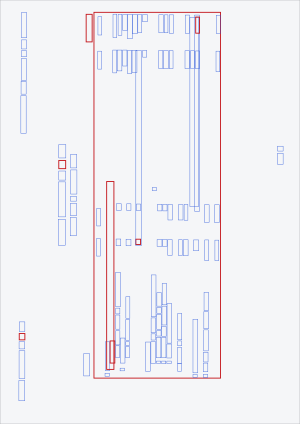
One test page as it came in, a portrait image with the text running sideways. Each outline is one word box found on it: tall and narrow, not on the words. The page content is not shown. Run offline-2.
Rotated page OCR before the fix: 17 of 127 words with a box
20 public test pages went through the offline merge of language-model text and CTC boxes. One of them, a hard page that was scanned sideways, shows the whole problem:
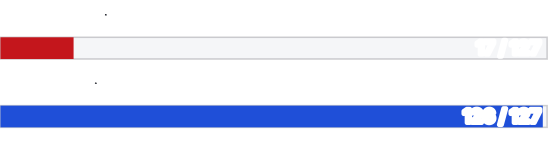
Words on one turned test page that matched a CTC box. Left row: page left as scanned. Right row: page turned upright first, boxes mapped back. Run offline-2, one sideways test page.
17 of 127 words with a box, that is 13 %. With the fix, 126 of 127, that is 99 %. Over all 20 pages the share of words with a box went from 96.91 % to 99.39 %. The other 19 pages hardly moved. This is one page that went from useless to usable, and that is the page a customer would complain about.
OCR for rotated pages: detect orientation, turn upright, map the boxes back
- Ask the page which way is up. A small document-orientation classifier looks at the whole page and answers: 0, 90, 180 or 270 degrees. It takes about 0.007 s per page in the test.
- Turn the page upright by a multiple of 90 degrees. That is lossless: no resampling, only a rearrangement of pixels.
- Run the usual detector and OCR engine on the upright page.
- Map every box back to the frame of the original image, so that the boxes you get lie on the page you sent, not on the turned copy.
Step 4 is the one that is easy to forget. Without it the text is right and the boxes land in the wrong corner of your viewer.
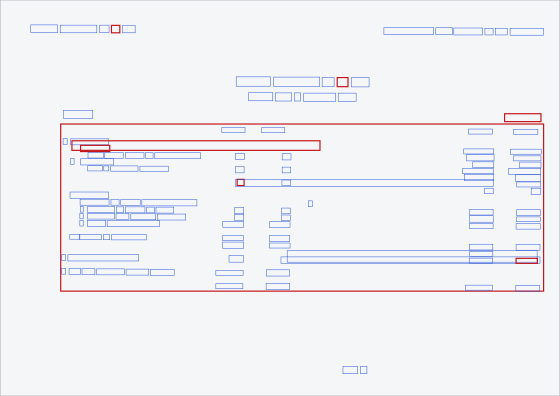
The same boxes after turning the page upright: wide, in reading order, on the words. 8 of the 127 words are flagged (red). Run offline-2.
The page is turned only when the classifier is sure: by default at a classifier score of 0.8 or more. A variant accepts scores down to 0.5 and then reads the page both ways and keeps the better reading. The pipeline with the turning step is a separate one; the plain one without it stays as it is.
Page orientation accuracy: 231 of 240 rotated pages named right, upright pages left alone
A step that turns pages has to be safe on pages that are already fine, so the same tests cover those:
| Test | Result |
|---|---|
| Sideways test page, key values found in a focus region | 1 of 29 without, 28 of 29 with the fix |
| 80 public pages, each turned by 90, 180 and 270 degrees (240 images): orientation named correctly | 231 of 240 (96.3 %) |
| The same 240 images, actually turned upright at the default score of 0.8 | 223 of 240 (92.9 %) |
| Of those 223 pages: text and boxes compared byte for byte with the upright original | 223 of 223 identical |
| The 80 upright pages: turned by mistake at 0.8 | 1 of 80 |
| 30 images skewed by 1 to 3 degrees | 30 of 30 left untouched |
17 of the 240 turned images stayed sideways at 0.8: for 9 the orientation was named wrongly, mostly on very thin pages with little text, and for 8 the score was below 0.8. And 1 of 80 upright pages was turned although it should not have been. A lower score turns more of the sideways pages but also more upright ones, so the score setting is a trade-off. Slightly skewed pages (1 to 3 degrees) stay as they are: the 30 skewed images were left untouched.
Cost of the orientation step: about 0.03 s per page
- The box figures come from the offline merge on a CPU. The orientation step adds about 0.03 s per page on the test card (1.69 s against 1.72 s per page), measured on single pages, not as throughput.
How to test your own OCR on rotated pages: three checks
- Turn 10 of your pages by 90 degrees and run them through your OCR. Do the boxes still sit on the words?
- Draw the boxes on the original image, not on a processed copy. If your tool only shows them on a copy, ask how they get back.
- Count the words with a box and divide by the words in the text. A big gap on a few pages tells you where to look.
Sources
| Statement | Where it comes from |
|---|---|
| 17 of 127 words with a box without, 126 of 127 with turning, one sideways page | merge run offline-2, per-page file, 20 public pages, CPU only |
| 96.91 % to 99.39 % over 20 pages | same run, all 20 pages |
| 1 of 29 to 28 of 29 key values in the focus region | run smoke-hart, canon without and with the orientation step, 10 pages, one sideways |
| 231 of 240, 223 of 240, 223 of 223 identical, 1 of 80 falsely turned, 30 of 30 skewed images left alone | 80 public pages turned by 0/90/180/270 degrees and 10 pages skewed by 1, 2 and 3 degrees (30 images) |
| 0.007 s classifier per page | run rotation-wide, mean per page |
| boxes figures | box coordinates of that page from the merge run; page content not shown |