LLM on OCR: chat with scanned PDFs, fill forms, translate a scan
The text is read. Now you want the invoice number, the clause, the answer. A model can do that, and every answer still points at its place on the page.
The free test reads one page of your own scan, the step every model answer stands on. Price of a model project: on request.
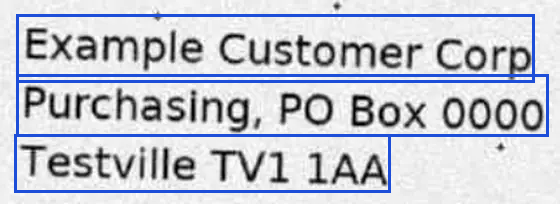
Line Three lines, each with its box and a confidence of 0.99, 0.99 and 0.99. Boxes: as returned by a pipeline.

Language model on grounded OCR: every answer tied to words and boxes
A model on the PDF alone
An answer with nothing to check it against. The day it invents something, nobody sees.
A model on grounded OCR
Every value is tied to words and boxes on the page. Someone can look at the spot.

Chat with scanned PDFs
Ask a question, get the answer with page and box.

Fill a form from a document
Read fields with a check on each.
Chat with a scanned PDF: answers with page and box
Your chat answers in calm, confident sentences. Which page is that from? Without a click to the word in the scan, the answer cannot go into a meeting. When the text under the chat is wrong, the answer still sounds right.
Own run over 300 public pages. Which means: a chat needs text that is read, not generated. A pipeline with word boxes returns text with a box and a confidence for every word, and no word that no OCR engine read.
- Send the document and ask for
format=json. - Cut the text into pieces for your own search index. Keep page and box with every piece.
- Let your chat answer from the pieces it finds.
- Show each quote with its page and its box in the scan.
- Mark words with a low confidence or a disagreement inside the quote.
Fill a form from a scanned document with a check on every value
A wrong digit in a form looks like data, and it travels on into your system. You need the check before the number is stored. Wrong values that look right are counted next to the missing ones.
Six hard pages, 135 target values:
| Result | What it is |
|---|---|
| 105 of 135 | Target values found by the character engine alone; 5 of them silently wrong. |
| 131 of 135 | Found by a language model with a word OCR engine; 0 silently wrong. |
Source: run on six hard pages, published in the gallery. The combination is a language-model pipeline. Read more: receipts and invoices, one spot, ten systems
- Send the document with
format=json. - Find a field by its label and the box next to it: "Total" and its right neighbor.
- Take the value only if its confidence is high and the OCR engines agree; else list it for a person.
- Second witness: net plus tax must equal gross.
- Store page and box with the value, so anyone can look it up in the scan.
The field names are yours.
Translate a scanned PDF and keep the layout
A translation that comes back with the table gone and the numbers moved is useless. Two things decide, and both come from the OCR: the digits you hand over, and the place of every block.
- Check the numbers first, as in the form steps above. A misread digit stays wrong in every language.
- Send the page with
format=jsonandmd; take text blocks with their boxes and tables cell by cell. - Translate each block on its own; mark numbers and names as fixed.
- Compare the length of the translation with the box. If it is too long, shrink the type or hand the block to a person.
- Put each block back into its box. Check low-confidence words before the translation, not after.
For tables the grid decides; the count on 35 tables is in the table engine.
Parse invoices and search a scan archive with a language model
- Parsing: the fields of an invoice, a form or a contract as structured data.
- Interpretation: what a passage says, sorted into your categories.
- Search across an archive, with the hit shown on the page.
In all three the answer carries its source: the words and the place they came from.
LLM on OCR for confidential documents: on-premise
Index, chat model, translator and page rebuild are yours; the OCR delivers blocks, boxes, table cells and confidences, and a person checks the spot on the page, not the whole page. Checkboxes and key-value pairs are read from the words and boxes, as in the steps above. For a project with a model, timing and price go into a written offer. Contracts, statements and forms stay in your network when the OCR and the model run on your own server.
Try the OCR under the model free
Read one page of your own scan and see the words and boxes a chat, a form or a translation would stand on.
Production use, high volume or your own server?
Private use and tests are free. For a company in production, a server of your own or a pipeline built on your pages, send the kind of page and the volume, and get a written offer, or a clear no when the fit is not there.
