
On this page
- How the OCR intake answers: nine outcomes and their codes
- Arrival: empty, almost empty and not a PDF at all
- Nothing, almost nothing, noise
- Wrong type, right confidence
- File structure: a PDF whose map is wrong
- A damaged map: cut off, wrong pointer, wrong offsets
- An empty tree, and a tree that points at itself
- Page counts that lie
- Page size: huge, zero, negative and not a number
- Pages that claim to be enormous
- Sizes that make no sense
- The page that is huge on paper and small in the viewer
- Content: bombs, self-reference and a million lines
- Four bombs: small file, large afterwards
- Loops and floods inside the page description
- Images: a header that claims more than the file holds
- Headers that promise too many pixels
- Headers that are cut off or empty
- Encryption: password-protected PDFs
- Locked with a password
- Locked, but with an empty password
- Active content and paths to the outside: JavaScript, launch and file references
- A script that runs on opening
- Launch a program, fetch a local file
- An image that lives in someone else's file
- An attachment with a name that tries to be a command
- Combinations that are not in the corpus
- Scope: what this test covers and what to check on your own files
What happens to your OCR service when the PDF is not a PDF, or is one that lies about itself? If the answer is "it depends on the file", someone will eventually find the file.
On 11 November 2026, 41 deliberately broken files went through the intake of this OCR service, which checks every upload before any page is read. Every file ended in ok or in one of eight fixed error codes. None crashed the service, none hung, and no document stayed on disk. One file ended by the clock after 20 seconds; the other 40 took 1.4 seconds or less. Which means: a customer who uploads a hostile file gets a plain answer within seconds instead of a stuck job.
One run on one Windows laptop, with normal background load, and nothing under load yet. Times are single runs. Linux on the server and the same files under parallel load (run F) are not measured yet. The last section lists the scope.
This page is also a reference. Each case has its own anchor, named like the file in the test corpus, so that a test report can point at exactly one of them, for example #flate_bomb_content_stream. The cases follow the path of an upload through the service: arrival, file structure, page size, content, images, encryption, and finally the things a PDF may ask the reader to do.
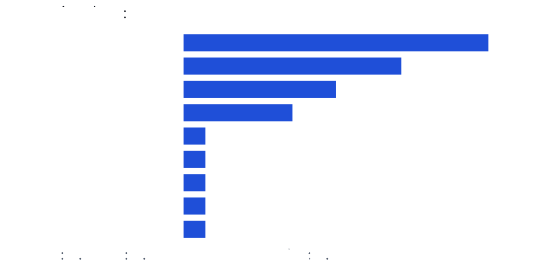
How the OCR intake answers: nine outcomes and their codes
An upload is accepted or refused before any OCR runs. The intake answers with ok or with a fixed code:
| Code | Meaning |
|---|---|
empty_document | the upload has no bytes |
unsupported_type | not a PDF, PNG, JPEG or TIFF |
invalid_document | the type is right, the content cannot be read |
too_many_pages | more than 1,000 pages |
page_too_large | a page needs more than 40 million pixels at the render resolution |
password_required | the file is locked with a password |
resource_limit | the page renderer hit its memory limit of 1 GiB |
timeout | a page took longer than the page time limit |
ok | accepted and rendered |
The limits are the defaults in the code of the service (DefaultLimits). The page time limit is 60 seconds in operation; the test ran with 20 seconds so that the one slow case does not sit out a minute. PDF pages are drawn by Poppler (pdftoppm) in a child process, one process per page, with the memory and time limits above. That is the safety net under everything in this list; how the pipelines are built is told elsewhere.
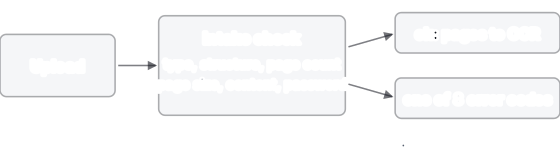
Arrival: empty, almost empty and not a PDF at all
The service reads the first 1,024 bytes of an upload and decides by its signature. A PDF announces itself with the text %PDF-; PNG, JPEG and TIFF have their own. Nothing is opened, unpacked or run at this point.
Nothing, almost nothing, noise
A naive service hands whatever arrives to its PDF library and waits to see what happens. These three files show what the library has to survive when it is asked.
The empty upload
Zero bytes: what a client sends after a failed export. Result: empty_document in 1 ms.
A header and nothing else
Nine bytes: %PDF-1.7 and a line break. It claims to be a PDF and offers no pages, no objects, no end. Result: invalid_document in 26 ms; the page counter of Poppler refuses it.
A header, then noise
The same header followed by 64 KiB of pseudo-random bytes. The signature passes, so the file does reach Poppler, which finds no document in it. Result: invalid_document in 34 ms.
Wrong type, right confidence
Files that do not even pretend. The door rejects them by signature, in milliseconds, before any parser sees them. Which means: whatever vulnerability a parser may have, a file of the wrong type never reaches it.
One megabyte of random bytes
No known signature. Result: unsupported_type in 3 ms.
A Windows program in a document upload
Starts with MZ, the signature of Windows executables, followed by 4 KiB of noise. A program, uploaded to a service that reads documents. Result: unsupported_type in 2 ms.
HTML with a script tag
38 bytes: <html><script>alert(1)</script></html>. The service never renders HTML, so the script has nobody to run for. Result: unsupported_type in 3 ms.
A PDF behind 2 KiB of junk
2,048 letters A, then a valid PDF. Some readers search the whole file for the signature and accept this. The intake looks only at the first 1,024 bytes, so the valid PDF starts too late to count. Result: unsupported_type in 5 ms. A customer whose file really has more than a kilobyte in front of the header gets this code too; the corpus does not say how common that is.
The first 512 bytes of a zip file
A zip archive, cut off after 512 bytes: no valid archive, and not a PDF either. It is the leftover of the archive bomb in the content section below. Result: unsupported_type in 4 ms.
The files that pass the door as PDFs have one more thing in common: they come with a map of their own insides.
File structure: a PDF whose map is wrong
A PDF ends with an index. A table (xref) lists the byte position of every object in the file, and the last lines (startxref) say where that table starts. Pages hang in a tree: a root node lists child nodes, which list pages, and each node states how many pages are below it. Every one of these pieces can be wrong, and a reader that believes them blindly fails in a different way for each.
A damaged map: cut off, wrong pointer, wrong offsets
Real files break like this: an interrupted download, a bad export, a copy that lost its tail. A strict reader gives up; a tolerant one searches the file for its objects and carries on. The results below show which of the two Poppler is.
Cut in the middle
A valid 5-page file of 486,069 bytes, cut at half: 243,034 bytes. The index at the end is gone. Result: invalid_document in 38 ms.
A pointer to nowhere
The startxref number is changed so that it points far behind the end of the file; the rest is intact. Poppler repairs the map and renders all five pages. Result: ok in 529 ms for the five pages.
Garbage in the offsets
The digits in the table of offsets are overwritten with nines, so every object appears to sit in the wrong place. Result: ok in 342 ms, same repair as above.
Intact map or repaired one, the next question is what the page tree says.
An empty tree, and a tree that points at itself
A catalogue without pages
A valid structure, a page tree with zero pages. Legal in spirit, useless for OCR. Result: invalid_document in 36 ms.
A page tree that is its own ancestor
Node 3 lists itself as a child and node 4 lists node 3. A program that walks the tree to count the pages and does not remember where it has been never gets out. Result: invalid_document in 62 ms; the file is 376 bytes.
A tree can also be finite and lie about its size.
Page counts that lie
The page count decides how long a job runs and what it costs. Three files make it as large as the format allows, in three different ways. The service refuses above 1,000 pages.
A count of one million over one page
362 bytes, one real page, /Count 1000000. The page counter of Poppler does not accept this file, so the answer is invalid_document in 35 ms, not too_many_pages.
300,000 references to the same page
A 1.8 MB file whose page list names the one page 300,000 times. Result: invalid_document in 114 ms, again refused by the page counter.
A million pages, honestly declared
A 26 MB file (26,000,473 bytes) with a million references and the matching count. The page counter reads it and reports a million pages, so this is the one that reaches the page limit. Result: too_many_pages in 497 ms. The three files together: the counter itself stops the two that lie in a messy way, and the limit stops the one that lies tidily.
Counting pages is the cheap part. The next question is how large each of them is.
Page size: huge, zero, negative and not a number
Each page states its size in points, 72 to the inch. The service computes the pixels at the render resolution, 150 dpi by default, and refuses a page above 40 million pixels before anything is drawn. That is about 6,300 pixels square, or a sheet of 42 by 42 inches. An A4 page at 150 dpi has 1,240 by 1,754 pixels, about 2.2 million. Raw pixels take 3 bytes each, so the limit caps one page at 120 MB.
Pages that claim to be enormous
The files are about 1.2 KB each. A renderer that obeys them tries to allocate the page first and finds out afterwards.
100,000 pixels at 150 dpi
48,000 points on each side: exactly 100,000 pixels per side at 150 dpi, 10 billion pixels, 30 GB as raw colour pixels. Result: page_too_large in 66 ms.
A sheet 200 inches wide
14,400 points are 200 inches, 30,000 pixels per side at 150 dpi: 900 million pixels, 2.7 GB raw. Result: page_too_large in 69 ms.
A billion points
[0 0 1000000000 1000000000]: about two billion pixels on each side. Result: page_too_large in 65 ms.
Sizes that make no sense
A page of zero width, negative width or a width that is not a number has no pixels at all. A naive allocator multiplies them anyway. Poppler does not hand such sizes on: its page counter reports a standard page instead, and the intake renders that page. The intake itself would refuse any size that is not a positive finite number as invalid_document; with this Poppler it never has to.
Size zero
[0 0 0 0] becomes a US Letter page, 612 by 792 points. Result: ok in 111 ms.
Negative corners
[0 0 -595 -842] becomes an A4 page of 595 by 842 points: Poppler reads the corners in the right order. Result: ok in 111 ms.
The text NaN where a number belongs
[0 0 NaN Inf]: words where numbers should be. The page becomes US Letter. Result: ok in 118 ms.
The page that is huge on paper and small in the viewer
A crop box inside a giant media box
The media box says 48,000 points, as in the case above. A second entry, the crop box, says that only 100 by 100 points are shown. Poppler reports the size of the visible part: 100 by 100 points, and the size check uses that number. Result: ok in 91 ms. The opposite trap, a small crop box over a large drawing, is not in the corpus.
A harmless page size does not say anything about what is drawn on it.
Content: bombs, self-reference and a million lines
Four bombs: small file, large afterwards
A bomb is a small file that becomes enormous when unpacked. The point is the ratio: a few hundred kilobytes in, gigabytes out. Two of the four hide in the page content of a PDF, two are archives pretending to be uploads. The archives fall at the door because the service does not open archives at all. The content streams reach Poppler, which runs in a child process with 1 GiB of memory.
A content stream that inflates to 256 MiB
One page whose drawing instructions are compressed with Flate (the zip algorithm) and consist of blank space only. The file has 261,391 bytes and inflates to 256 MiB, about 1,000 to 1. Result: ok in 1.35 s. In the earlier renderer run at 512 MiB (lauf-20261110, variant A) the child peaked at 73 MB: Poppler does not hold the inflated stream in memory.
The same, three layers deep
The stream is compressed, the result is compressed again, and again. 859 bytes in the test, 64 MiB at the bottom. Each layer hides the true size of the one below. Result: ok in 434 ms.
Zip inside zip inside zip
Three nesting levels with eight copies each: 512 copies of a leaf that holds 64 MiB of zeros, 32 GiB if someone unpacked all of it. The file is 7,990 bytes. Its entry names start with ../../, an attempt to write outside the target folder. Result: unsupported_type in 4 ms. The intake never unpacks an archive, so neither the size nor the names matter.
A gzip file of zeros
260,930 bytes that inflate to 256 MiB. Result: unsupported_type in 6 ms.
Bombs are brute force. The next three cases make the renderer work on its own.
Loops and floods inside the page description
A PDF page is a small program of drawing instructions: save the state, draw a path, call a stored figure. Its grammar allows things that are valid and have no sensible end.
A figure that draws itself twice
A stored figure (a form) calls itself, and calls itself again right after: if followed, the work doubles at every level. The file is 660 bytes. Result: ok in 140 ms: Poppler ends the recursion.
Two million saved states
The instruction q saves the current drawing state, Q restores it. Two million q in a row, never a Q, make a 4 MB file with a stack that grows with every instruction. Result: resource_limit in 696 ms: the child hit the memory limit of 1 GiB (peak recorded in the renderer run: 1,086 MB, lauf-20261110).
300,000 lines on one page
Each line is small and valid: 0 0 m 595 842 l S, a diagonal across the page. Together they are 5.4 MB and a page that Poppler does not finish. Result: timeout after 20.1 s, the page limit of the test. It is the only case in the corpus that ends by the clock, and in operation it would run to the 60 seconds of the default limit.
Pages are not the only things with a size in the header. Images carry theirs too.
Images: a header that claims more than the file holds
A PNG or JPEG states its width and height in the first bytes. The intake reads that header and nothing else before it decides, then checks that the file has its proper ending, so a cut-off file is refused at once instead of failing on its first page. The file size limit for an image is 10 MiB.
Headers that promise too many pixels
Tiny files that, if believed, would decode to gigabytes.
A PNG of 100,000 by 100,000 pixels in 77 bytes
Ten billion pixels, claimed by a file of 77 bytes. Result: page_too_large in 4 ms.
A JPEG of 65,535 by 65,535 pixels in 27 bytes
65,535 is the largest value the format can store: 4.3 billion pixels. Result: page_too_large in 4 ms.
Headers that are cut off or empty
A PNG cut inside its header
20 bytes: the signature and the start of the first block. Result: invalid_document in 2 ms.
A PNG of zero by zero pixels
A valid header for an image of no size. Result: invalid_document in 1 ms.
A JPEG of six bytes
The first six bytes of a JPEG header and nothing more. Result: invalid_document in 5 ms.
Everything so far was readable by anyone. Some PDFs are locked.
Encryption: password-protected PDFs
A PDF can carry two passwords: one to open it, one to restrict printing and copying. The corpus uses the old standard encryption (RC4, 40 bit). The service cannot guess a password and does not try.
Locked with a password
The file needs the password secret to open. Result: password_required in 44 ms. The customer gets a code that says what is missing instead of a failed job.
Locked, but with an empty password
The file is encrypted, yet the password to open it is empty, so every reader opens it without asking. Result: ok in 149 ms. The intake notes that the file is encrypted and processes it. Output as a searchable PDF is a different matter: that feature refuses encrypted files.
Opening a file is one thing. The last four cases are about what the file asks the reader to do.
Active content and paths to the outside: JavaScript, launch and file references
A PDF may contain scripts, commands to start programs, links, and paths to other files. A viewer such as Acrobat has to deal with them. This service only draws pages: Poppler runs none of it, and the intake opens no path named in a file. The test checks that each of the four files ends in ok; it does not record file or network access, so the claim that nothing was opened rests on the design, not on a trace.
A script that runs on opening
An action that fires when the document opens: an alert, a form submission to the local machine, and a named script that never ends (while(true){}). Result: ok in 142 ms. Poppler reports that the file contains JavaScript, and the intake records that flag on the document; nothing else uses it yet.
Launch a program, fetch a local file
One action asks the reader to start a Windows program, another to open file:///etc/passwd, the password file of Linux machines. Result: ok in 148 ms.
An image that lives in someone else's file
An image object whose data is a file specification, with paths that climb out of the folder, in the Unix and the Windows spelling. Result: ok in 140 ms.
An attachment with a name that tries to be a command
An embedded file named like a path that leaves its folder, and with a display name of --help, which a careless script might pass to a command line as an option. The attachment is never extracted. Result: ok in 143 ms.
Combinations that are not in the corpus
Each file above has one flaw. Real damage adds up, and some pairs are worse than their parts. These pairs are not measured, so no result is claimed:
- A page tree that points at itself, with a huge declared page count.
- A giant page size on the same page as a content bomb. By the order in the code the size check runs first and the bomb is never read; that is an expectation, not a measurement.
- A document of 1,000 pages where every page ends by the clock. At 60 seconds each that would take 16 hours; by the limits in the code, the 30 minutes for a whole document end it first.
- A password-protected file with a huge page.
- A bomb whose stream is cut off in the middle.
Scope: what this test covers and what to check on your own files
- Test:
TestHostileCorpusGivesFixedCodesin the intake of the service, revisiona2032902, run 11 November 2026 withgo test. The corpus is generated in code and holds no customer files; 41 of its files are hostile, one is a valid 5-page PDF as control, and 34 more are multi-page TIFF cases that are not part of this page. - Pass criteria: each file ends in
okor an expected code from a fixed list per case; no crash, no hang; the child process stays within its memory limit (limit plus 16 MiB); the work folder is empty afterwards. - Outcomes of the 41 files: 14
ok, 10invalid_document, 7unsupported_type, 5page_too_large, and one each ofempty_document,password_required,resource_limit,timeoutandtoo_many_pages. - Machine: one Windows laptop (the service itself is rolled out from a clean commit on the server, where this test has not run), Poppler tools version 26.09.0, no isolation from background load (
sauber: falsein the raw data). Times are single runs and show the order of magnitude, not a benchmark. The memory limit works through a different operating-system mechanism on Linux; the Linux behaviour is not measured. - Not covered: the same files under parallel load (run F), customer files of other kinds, PDF features that no case in the corpus names, and the other renderers (those are compared in PDFium vs Poppler for OCR).
- To check on your own files: the limits (1,000 pages, 40 million pixels per page, 10 MiB per page and per image, 100 MiB per upload) and which of them your real documents come near.
| Source | Where |
|---|---|
| Cases and expected codes | bench/exp/pdf-renderer/korpus/corpus.go |
| Result, times, machine | bench/exp/pdf-renderer/ergebnis/korpus-dienst-20261111/ (test.log, result.json) |
| Memory peaks of Poppler (73 MB and 1,086 MB) | bench/exp/pdf-renderer/ergebnis/lauf-20261110/ausfaelle_a.log |